


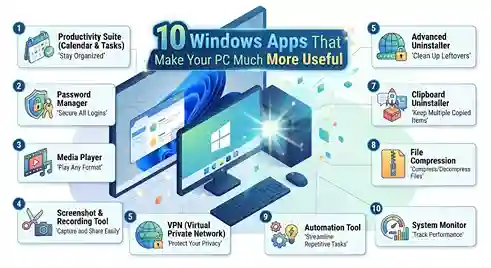
Windows Apps That Make Your PC Much More Useful are the quiet fix for a problem almost every desktop user runs into eventually: the built-in tools only go so far. A fresh install feels fine for about a week, and then the cracks show up. A file goes missing even though you’re certain you saved it. Screenshots pile up unedited on the desktop. One program blasts music while another fires off notifications, and there’s no easy way to quiet just one without killing both.
None of this means Windows is broken. It just means the default toolkit was never built to handle every workflow, and that’s exactly where a small stack of third-party software earns its place. Nothing bloated, nothing overloaded with features nobody asked for — just focused tools built around real daily friction instead of a marketing checklist.
PowerToys Adds Missing Desktop Controls
Windows never shipped with proper window-zoning, bulk file renaming, or a built-in way to lift text straight out of an image. PowerToys, a free official Microsoft toolkit, closes those gaps in one lightweight package instead of a random third-party patch job.
It isn’t really one app. Think of it as a drawer of small, purpose-built utilities you install once and switch on only where needed.
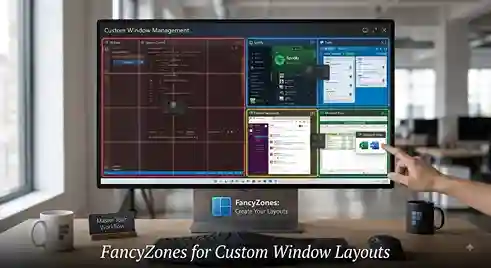
FancyZones for Custom Window Layouts
The standout feature here is FancyZones. Drag a window toward a screen edge and instead of the usual half-and-half snap, it drops into a custom zone you’ve already defined. On an ultrawide monitor or a two-screen desk setup, this one feature changes how multitasking feels almost immediately.
Bulk renaming, quick image resizing, and screenshot text extraction round out the rest, saving a handful of separate downloads that would otherwise clutter the Start menu.
Everything Locates Files in Seconds
Windows Search crawls through file contents, which turns painfully slow once a drive holds a decade of downloads, folders, and half-forgotten documents. Everything skips that step completely by indexing file and folder names only, so results show up the instant you type instead of after a spinning wheel.
Anyone who’s ever remembered a filename clearly but had zero memory of the folder it landed in already understands why this stays pinned to the taskbar for good.
ShareX Builds Real Screenshot Documentation
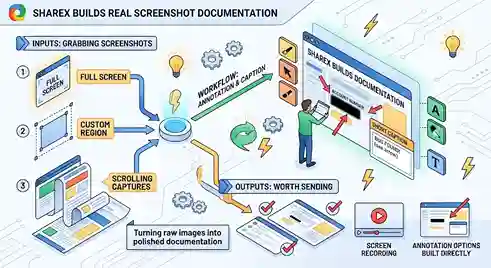
Grabbing a screenshot in Windows takes a single key press. Turning that raw image into something worth sending — an arrow pointing at a bug, a blurred account number, a short caption — needs a proper tool.
ShareX covers full-screen grabs, custom regions, scrolling captures of long web pages, and screen recording, with annotation options built directly into the workflow.
Screenshot Tools for Everyday Communication
Bug reports get sharper. Tutorials stop needing paragraphs of explanation. Remote troubleshooting stops relying on someone describing their screen from memory. Once a screenshot becomes editable and shareable within seconds, it stops being a static file and starts doing real communication work.
7-Zip Manages Archives Windows Can’t
Compressed files land in downloads folders constantly, and native Windows support doesn’t stretch to cover every format that shows up. 7-Zip closes that gap with a small, no-frills utility built around strong compression, particularly its own 7z format.
Right-click, extract, done — no separate application window required first. It stays lean by design instead of turning into a bloated file-management suite nobody asked for.
VLC Plays Almost Any File Format
Format compatibility issues still crop up more often than they should. VLC sidesteps the problem by supporting an unusually wide range of video and audio formats inside one player, removing the need for a separate app every time an odd file type appears.
Subtitle syncing, playback speed adjustment, audio track switching, and network stream support all sit inside the same interface, though casual use never needs to touch that menu depth. Open the file, hit play, done.
EarTrumpet Fixes Windows’ Clumsy Volume Mixer
The default Windows volume slider controls every running app at once, which falls apart the second two or three programs are making noise simultaneously. EarTrumpet drops a separate volume slider for each app straight into the system tray.
Picture background music playing while a call notification suddenly interrupts — muting just the notification without touching the music becomes a two-second fix instead of a scramble through settings menus.
EverythingToolbar Puts Search on the Taskbar
Paired with the Everything search engine, EverythingToolbar moves that same instant search directly onto the taskbar. No separate window to open, no extra click before typing a filename.
For anyone searching files dozens of times a day, that small placement shift adds up to a noticeably smoother rhythm across the whole workday.
WizTree Reveals Where Storage Disappears
A drive filling up with no clear explanation ranks among the more frustrating PC mysteries. WizTree solves it with a fast visual scan showing exactly which folders and files are consuming the most space.
Old installers, forgotten downloads, bloated cache folders, and duplicate media tend to pile up quietly over months. A visual map turns hunting them down into a five-minute job instead of an afternoon spent opening folders one by one.
Ditto Remembers Everything You Copy
Copy something, paste it, move on — that workflow holds up fine until a second or third item needs copying in sequence, and the first one disappears the moment something new replaces it. Ditto keeps a running clipboard history instead, so nothing gets lost mid-task.
Writers, developers, and spreadsheet users run into this constantly: copy a sentence, then a link, then another line, only to need that first sentence again a few minutes later. With clipboard history active, there’s no backtracking required.
Bitwarden Keeps Passwords Organized
Remembering dozens of separate, unique passwords by memory simply doesn’t work, and reusing the same one everywhere creates real security risk. Bitwarden centralizes every login inside one encrypted vault and generates strong, unique passwords whenever a new account needs one.
The real time savings show up in what gets skipped — the repeated password-reset emails, the digging through old notes, the risky habit of reusing a weak password across banking, shopping, and work accounts all at once. Built-in autofill speeds up sign-ins across the board.
Choosing Windows Apps That Fit Your Workflow
Installing every tool on this list at once misses the point. Pick whichever daily annoyance bothers you most, add the single app built to fix it, and expand from there only if it earns its place.
That’s really the pattern behind every useful Windows app worth keeping around: PowerToys sharpens desktop control, Everything and Everything Toolbar erase file-search delays, ShareX turns screenshots into real documentation, 7-Zip covers the Archive formats Windows fumbles, and VLC removes format headaches entirely. EarTrumpet and Ditto smooth out small but constant daily irritations, WizTree clears up storage confusion, and Bitwarden keeps login chaos under control.
None of these apps reinvent Windows from the ground up. What they do instead is strip away the small daily frictions that quietly cost real time — and a PC running even a handful of them ends up feeling noticeably lighter to use every single day.
