


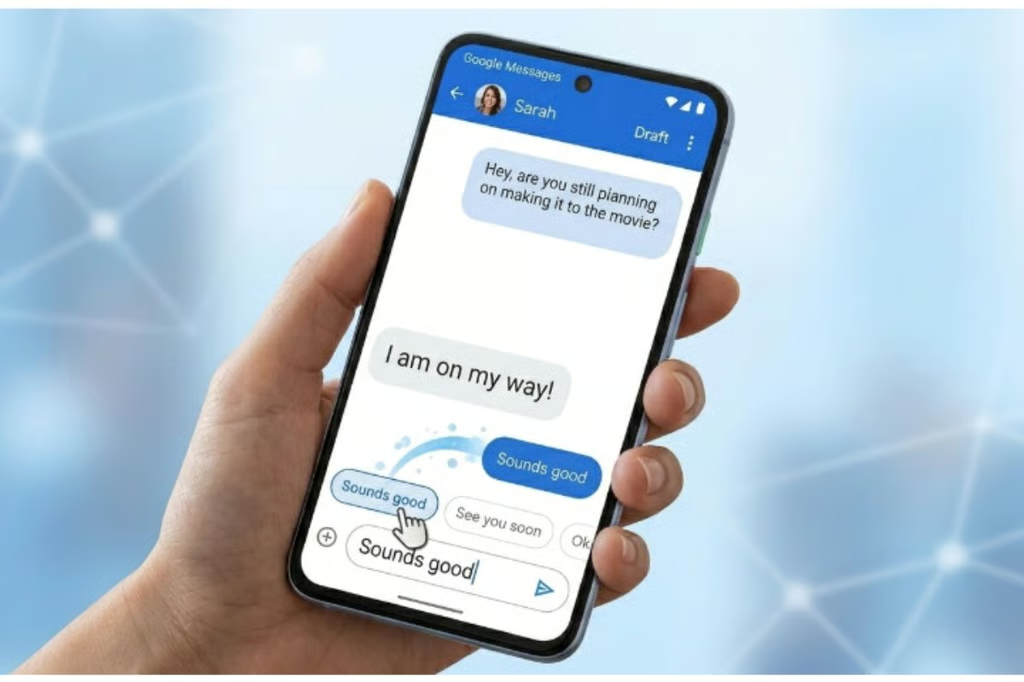
Google Messages is testing Tap to Draft, a new beta feature that lets users edit Smart Replies before sending and helps prevent accidental texts.
Google Messages is introducing a new feature that gives users more control over Smart Replies before sending them.
Called Tap to Draft, the feature builds on the existing Tap to Send option, which allows users to send a suggested response instantly by tapping it in the Messages app. With Tap to Draft, users can review and edit a suggested reply before it is sent.
According to a recent report from 9to5Google, Tap to Draft is currently available in Google Messages beta version 20260303_00_RC00. The feature is expected to reach the stable version of the app in a future update.
The Problem Tap to Draft Solves
Smart Replies is one of the most convenient features in Google Messages. Powered by AI, it analyzes conversations and suggests a few relevant responses that users can tap to send instantly.
However, the convenience of Tap to Send also came with two notable drawbacks.
First, users had no way to edit a Smart Reply before sending it. If the suggested response needed even a minor change, users often had to send it as-is or send another message to clarify their response.
Second, the instant-send behavior could lead to accidental messages. Since a single tap immediately sends the suggested reply, users could easily send a response by mistake.
An earlier report from 9to5Google in January revealed that Google was working on a solution to these issues. That solution is now taking shape as Tap to Draft.
Unlike Tap to Send, Tap to Draft does not immediately send a selected Smart Reply. Instead, tapping a suggestion places it in the message field, allowing users to review and edit the text before sending it with the standard send button.
What Else Do We Know About Tap to Draft?
Tap to Draft is currently being tested among beta users of Google Messages running beta version 20260303_00_RC00.
Users enrolled in the Google Messages beta program can check the Google Play Store for the latest update. Those who are not beta testers can join the beta program to gain access to features being tested ahead of their wider release.
However, beta software can sometimes contain bugs or cause unexpected behavior, so users should keep this in mind before installing it.
According to 9to5Google, Tap to Draft can also be switched on or off, similar to the existing Tap to Send option. The report notes that Tap to Send will remain the default behavior unless users manually enable Tap to Draft.
This gives users the choice between sending suggested replies instantly or reviewing and customizing them before they are delivered.
How to Enable Tap to Draft
Although Tap to Draft is currently available in beta, the stable release may still be several weeks away. Even after the feature reaches the stable version, Google typically rolls out new features gradually, meaning some users may have to wait anywhere from a few weeks to several months before it becomes available on their devices.
In the meantime, it’s worth knowing where to find the option and how to enable it once Google Messages makes it available on your account.
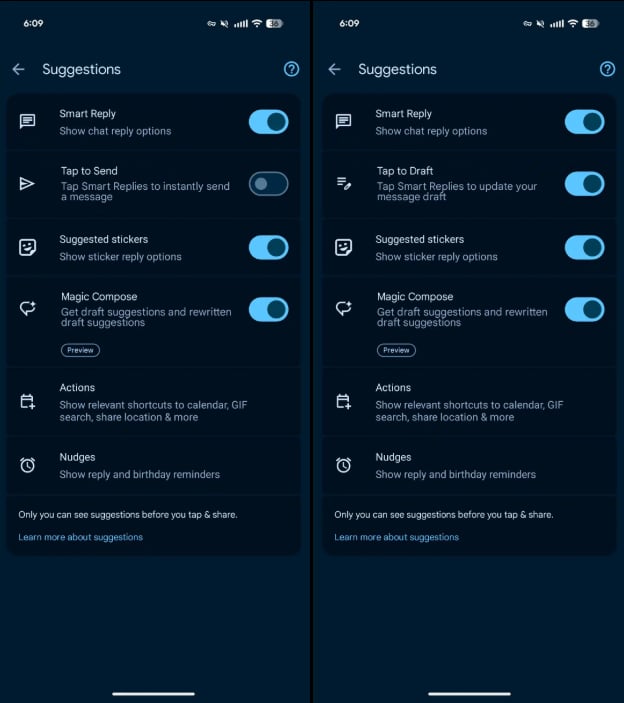
To turn on the feature:
- Tap the profile icon in the top right of your Message app screen
- Tap Message settings
- Then tap Suggestions
- Toggle the Tap to Send button to switch to Tap to Draft
Users who don’t want both Tap to Send and Tap to Draft can disable them by toggling off Smart Reply.
FAQs
What is the new editable Smart Replies feature in Google Messages?
Google Messages’ new Tap to Draft feature lets users edit an AI-generated Smart Reply before sending it.
How does Tap to Draft work in Google Messages?
Instead of sending a suggested reply immediately, Tap to Draft places the response in the message field. Users can review or modify it before tapping the send button.
Is Tap to Draft available to everyone?
Not yet. The feature is currently being tested with beta users and is expected to roll out to the stable version of Google Messages in a future update.
Can I still use Tap to Send in Google Messages?
Yes. Tap to Send remains the default behavior unless you manually switch to Tap to Draft in the Suggestions settings.
How can I enable Tap to Draft?
Open Google Messages, tap your profile icon > Message settings > Suggestions, then switch from Tap to Send to Tap to Draft when the option is available.
Can I disable both Tap to Send and Tap to Draft?
Yes. Users who do not want to use either option can turn off Smart Reply in Google Messages settings.
Conclusion
Google Messages’ new Tap to Draft feature gives users more control over AI-generated Smart Replies. Instead of sending a suggested response with a single tap, users can review, customize, and edit it before sending. This small but useful change could make Smart Replies more practical while also reducing accidental messages. As Google gradually rolls out the feature, more users should be able to choose between the convenience of Tap to Send and the flexibility of Tap to Draft.
