


Prompt Engineering in 2026: Write Better AI Prompts That Actually Work
Prompt engineering in 2026 looks very different from the tricks-and-hacks era of 2023. The three major labs — OpenAI, Anthropic, and Google — now agree on one core lesson: clarity beats length on every model, whether you use ChatGPT, Claude, or Gemini. Prompt engineering has become the craft of writing a clearer specification, not a longer one. This hands-on guide to prompt engineering 2026 covers the checklist, the structure, and the advanced techniques that work on every major model.
That shift matters because AI now does real work: drafting reports, debugging code, and running AI agents in 2026 that automate multi-step tasks. This guide is the complete prompt engineering 2026 playbook.
What Is Prompt Engineering in 2026?
Prompt engineering is the practice of designing inputs so an AI model reliably produces the output you want. In 2026, it is less about “talking to the AI nicely” and more about communicating like an engineer: define the goal, the constraints, the context, and how to judge success.
Anthropic’s golden rule captures the mindset: think of Claude as a brilliant but new employee who lacks context on your norms and workflows. If a colleague with little context would be confused by your prompt, the model will be too — and confusion is where errors come from.
The same applies to the powerful ChatGPT features most users never touch: they reward people who write down what they want instead of assuming the model will figure it out.
The Prompt Engineering 2026 Core Checklist
Before any important prompt, run it through this checklist — the distilled 2026 guidance from all three labs:
- State success criteria up front. “A 120-word summary naming the three main risks, written for a non-technical CFO” beats “a useful summary.”
- Define the output contract. Format, length, tone, and required sections.
- Give constraints, scope, and exclusions. “No paid tools” or “Android 15 and later only” rules out whole classes of wrong answers.
- Supply the context and data that must be used. A model cannot use what it cannot see.
- Add 1–3 examples when format or style matters. Examples beat paragraphs of description for anything stylistic.
- Include a verification step. “Verify every date against the sources and flag any you could not confirm.”
- Iterate. When confidence is low, ask clarifying questions first. A prompt is a first draft.
How to Structure an AI Prompt That Works
Follow this order and you fix most disappointing results:
Put instructions first, context second
Open with the action — then supply the material. Instructions buried after a wall of context get skimmed.
Use delimiters to separate roles
Mark where instructions end and data begins: triple quotes, headings (###), or tags like <context>...</context>. This matters most with pasted text — it marks data as data, not orders.
Specify the exact output format
For anything structured, name the schema:
Return a JSON object with exactly these keys:
{ "title": string, "word_count": number, "key_points": string[3] }
Do not add keys. Do not include markdown formatting.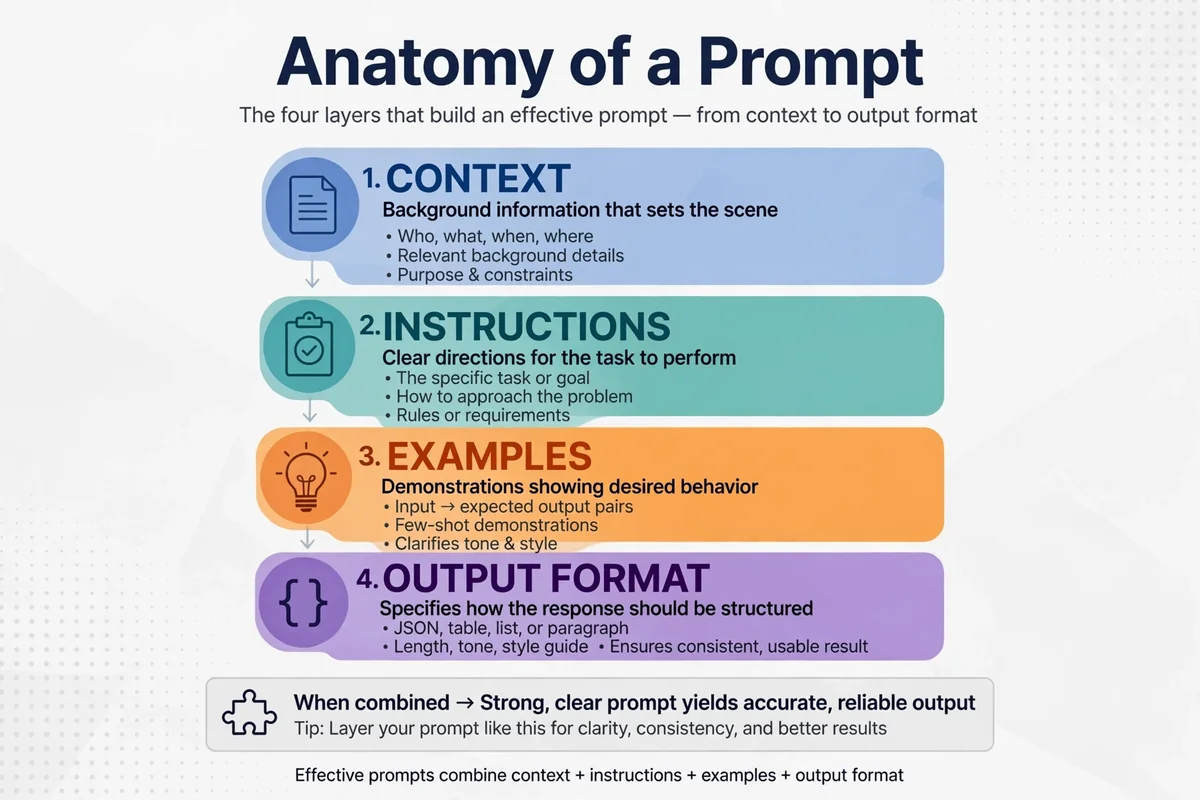
Few-Shot Prompting: When Examples Beat Instructions
Tone, formatting quirks, and classification boundaries are nearly impossible to describe but trivial to demonstrate. Few-shot prompting wins there: give one to three input-output examples and let the model infer the pattern.
Classify each ticket as billing, bug, or feature_request.

Example 1: "I was charged twice." → billing
Example 2: "The export button does nothing." → bug

Ticket: "Can you add dark mode to the dashboard?"
Label:
Keep examples diverse enough to cover edge cases — zero-shot plus strong structured context is the token-efficient baseline, and three good examples beat ten mediocre ones.
Chat Models vs Reasoning Models: Prompt Each Differently
In 2026 there are two kinds of model behind the chat box, and they want opposite things:
- Chat models (fast assistants) answer right away — like a junior co-worker. Give them explicit, detailed instructions.
- Reasoning models think internally before answering. Slower, but far better at complex multi-step work — treat them like a senior co-worker: give the goal and constraints, then trust the details.
Simple, stylistic task → chat model with a detailed prompt. Complex task with an unclear reasoning path → reasoning model with a lean, goal-focused prompt.
Advanced Prompt Engineering 2026 Techniques
Once the fundamentals are solid, these techniques solve the next layer of hard problems — ranked below by when each earns its keep.
Self-consistency for factual accuracy
Ask the model to solve the problem several times independently and compare answers. Converging paths mean high confidence; diverging paths reveal uncertainty.
Meta-prompting for complex multi-step tasks
Use the model to help design the prompt itself: describe the task and ask what information, examples, and checks a perfect prompt would need.
Tree-of-thought for multi-path reasoning
For strategy or debugging, have the model explore multiple reasoning branches, score each, and backtrack from dead ends.
Prompt chaining for big tasks
Split large jobs into smaller prompts — research → outline → draft → critique → revise — where each step’s output feeds the next, so you catch errors early.
Role prompting with real constraints
Generic “you are an expert” adds almost nothing. Roles work only with real constraints: “You are a tax auditor. Flag any claim that lacks a cited source. Reject estimates presented as facts.”
| Technique | Best for | Difficulty | When to use |
|---|---|---|---|
| Zero-shot + structured context | Everyday questions | Easy | Your default |
| Few-shot prompting | Style, format, classification | Easy | Pattern defies description |
| Prompt chaining | Long, multi-stage work | Medium | One answer is too long |
| Self-consistency | Research, math, facts | Medium | Accuracy beats speed |
| Meta-prompting | Novel task design | Medium | You cannot picture the prompt |
| Tree-of-thought | Strategy, planning | Hard | Paths must be compared |
| Role prompting (constraints) | Reviews, audits | Medium | A standard of judgment is needed |
| DSPy-style compilation | Repeated production tasks | Hard | Prompt runs hundreds of times daily |
Prompt Engineering 2026: Common Mistakes to Avoid
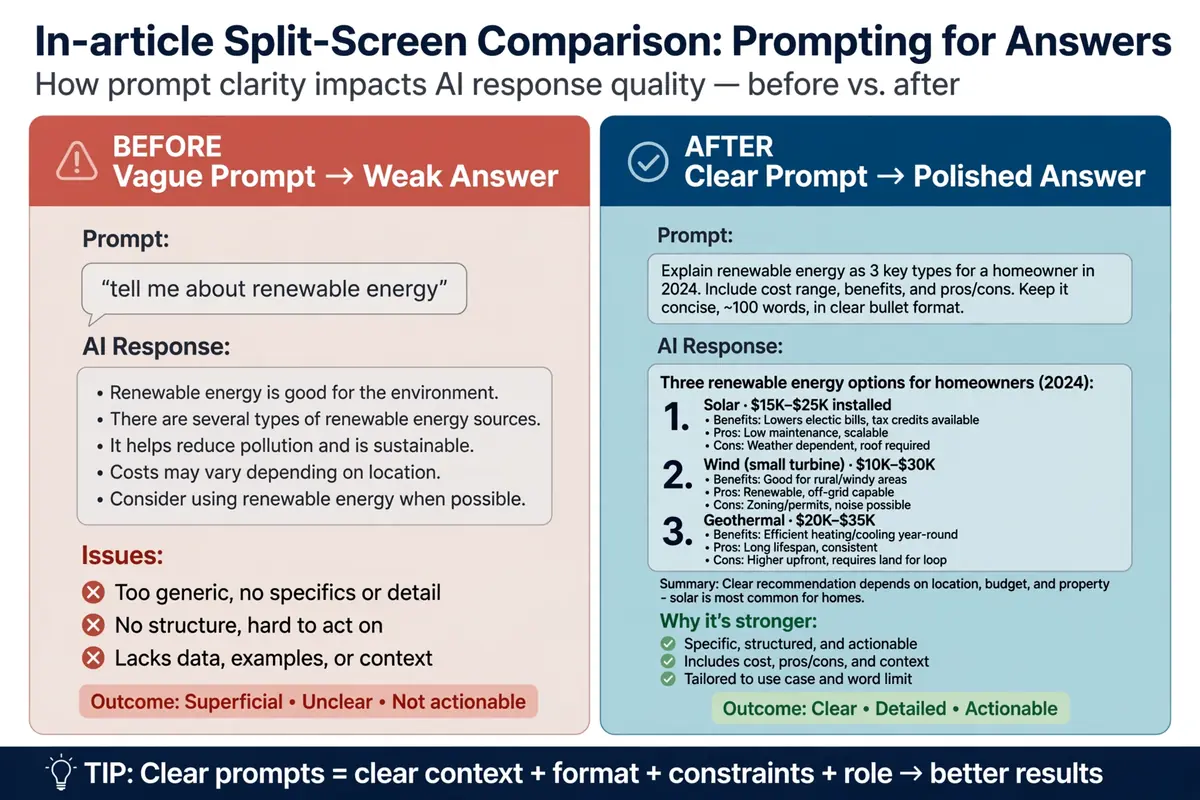
- The vague ask. “Write about marketing” invites a generic essay; “write a 300-word email opener for B2B SaaS founders worried about churn” invites a useful one.
- Context starvation. Expecting the model to know your tone, constraints, or numbers without being told.
- The kitchen-sink prompt. Five tasks in one prompt — split them into chained steps instead.
- No output contract. Getting a 900-word essay when you needed three bullets.
- Restarting instead of refining. One round of targeted feedback fixes most drafts faster than starting over.
- Treating pasted content as instructions. Rogue text inside pasted pages can hijack the model. Treat untrusted content as data, not instructions — your baseline guardrail against prompt injection.
Prompt Engineering 2026 for Chatbots and AI Agents
System prompts — the hidden instructions behind chatbots and agents — follow the same principles, with higher stakes: they run on every interaction.
Write system prompts like an operations manual
Define the role with real constraints, the tools it may use, the tone, escalation rules, and what it must never do. Every sentence should change behavior.
Use few-shot examples for tone
Two or three example exchanges lock in a voice better than adjectives like “friendly but professional.” Show, do not describe.
Build guardrails against injection
Agents read emails, web pages, and documents — all potential injection vectors. Delimit untrusted content, treat tool outputs as data, and add refusal rules for instruction-like text found inside data. For anything customer-facing, this is the 2026 baseline.
What Should You Practice Next?
Pick one recurring task — weekly reports, code reviews, customer replies — and apply the checklist to it for two weeks. Save each version, note what improved, refine rather than restarting.
Then close the loop professionals use: test, review, refine. Before relying on a prompt, self-check it — does the output match the contract, are the facts verifiable, would a colleague have misunderstood the instructions? Fix the weakest link and test again.
For background on the field’s evolution, see the prompt engineering article on Wikipedia.
FAQ: Prompt Engineering 2026
Do longer prompts work better?
No. The 2026 consensus is that clarity beats length. A short prompt with explicit success criteria, constraints, and an output contract outperforms a long rambling one.
Should I use a reasoning model or a chat model?
Use a reasoning model for complex, multi-step tasks — give it the goal and trust the details. Use a chat model for fast, stylistic, or straightforward tasks with explicit detailed instructions.
How many examples should few-shot prompting include?
One to three diverse examples. Three good ones beat ten mediocre ones, and zero-shot with strong structured context is the most token-efficient baseline.
What is the biggest prompt mistake beginners make?
Context starvation — asking for work that depends on information the model was never given, then blaming it for guessing.
How do I protect a chatbot from prompt injection?
Delimit untrusted content, treat tool outputs and pasted text as data rather than instructions, and test with adversarial inputs before anything goes customer-facing.
Final Thoughts on Prompt Engineering in 2026
Prompt engineering 2026 is not a bag of tricks — it is a communication discipline. State what success looks like, constrain the scope, supply the context, specify the output, verify the result, and iterate. Do that consistently and every model you touch will produce measurably better work.
The best prompt you will ever write is the one you refine for a task you do every week.
