


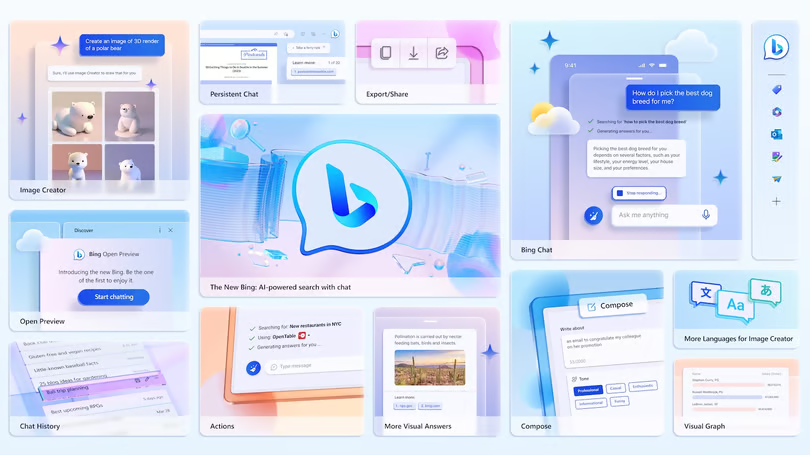
Persistent chats, image and video support, a convenient chat sidebar, and upcoming third-party plugins make Bing Chat more versatile, though it still has some limitations.
In the three months since Microsoft introduced GPT-4-powered chat to Bing, users have conducted more than half a billion conversations through the search engine. Microsoft has now removed the waitlist for Bing Chat, allowing anyone to access the service immediately. Users still need to browse with Microsoft Edge and sign in with a Microsoft account, but they no longer have to wait for approval before getting started.
Bing’s Upgraded Chat Features Add Images and More
Until now, Bing Chat has primarily delivered information in text form, sometimes organized into lists or tables. It could also display snapshots from standard Bing image and video searches. Microsoft plans to expand these capabilities by bringing images and videos directly into chat results, including images generated through Bing Image Creator. Users will also be able to receive charts and graphs when working with numerical data.
Microsoft is also working on a “multimodal” chat experience that will allow users to upload or paste images into a conversation and use them to search for related information. These visual capabilities are similar to features already available through Bing’s image search. However, Microsoft has not yet announced a specific release date for these upcoming features.
A More Useful Edge Sidebar
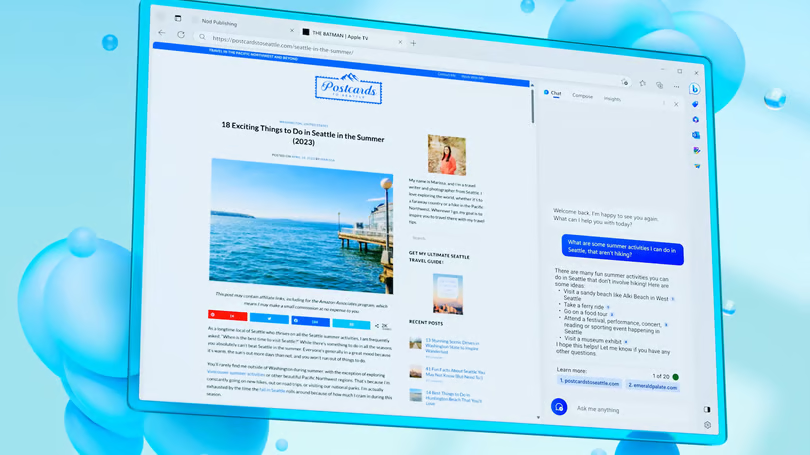
The updated Bing Chat experience will save previous conversations in the Edge sidebar. This will make it easier to revisit earlier responses, review information, or continue asking questions within the same conversation and context (Figure A).
Figure A
More Ways to Use the Edge Sidebar
The Edge sidebar already lets you start a Bing Chat conversation without leaving the page or navigating back to the Bing website. It can also use the web page you’re currently viewing to help answer questions or explain unfamiliar information.
For example, if a sentence or concept on a page is difficult to understand, you can copy it into the chat sidebar and ask Bing to:
- Explain the sentence in simpler terms.
- Answer a question about information mentioned on the page.
- Provide a general definition of a term or concept.
- Explain how the sentence relates to the content of the specific document.
Microsoft says roughly one-quarter of Bing Chat conversations already begin in the sidebar. The company is also exploring ways to use context from previous Bing Chat conversations to make future interactions more personalized and relevant, based on topics and information users have previously discussed. However, Microsoft considers this a longer-term development.
Microsoft also plans to bring the sidebar experience to the mobile version of Edge. This could be particularly helpful when reading lengthy web pages on a smartphone, allowing users to quickly understand the main points without having to read the entire page.
Bing Chat’s Conversation Limits
Currently, Bing Chat limits conversations to around five “turns” before it stops responding. These restrictions are designed to reduce the likelihood of the AI generating inaccurate information, or “hallucinations,” and help prevent conversations from becoming overly influenced by the tone or wording of the user’s messages.
If you begin a conversation in Bing, you’ll also be able to move it to the Edge sidebar when you open the web pages Bing used as sources. This makes it easier to keep the conversation available while reviewing those pages. It can be particularly useful when you want to examine the original information in greater detail or verify Bing Chat’s claims, since the cited source pages don’t always support the conclusions presented in the chat.
Better Insights
The Insights tab in the Edge sidebar already provides several ways to understand the web page you’re viewing. It can offer questions and answers to clarify complicated topics, highlight key points, provide links to searches related to major subjects, and surface relevant links and news stories.
Insights can also provide information about the website itself, including analytics that may help you determine whether a site is widely established or a more obscure source that may require additional verification. Microsoft says Bing Chat will also improve its ability to summarize lengthy content, including PDFs and long web pages.
Share and Export from Compose
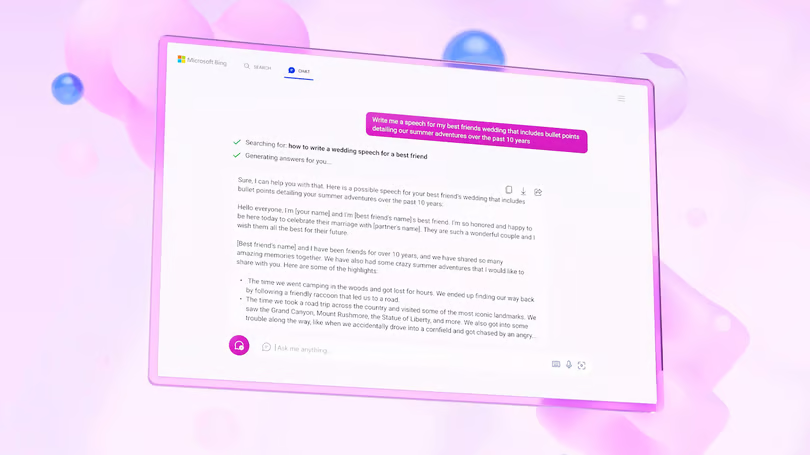
If you use the Compose feature in the Edge sidebar to create an initial draft, Microsoft plans to make it easier to share that content with colleagues or export it while preserving more of its original formatting. This means you won’t have to manually recreate the content in applications such as Word or Outlook (Figure C).
The Edge sidebar also provides options for adjusting the generated content. You can ask Bing to change its length or tone, or restructure it into formats such as a paragraph, list of ideas, blog post, or email.
Figure C
Edge Actions
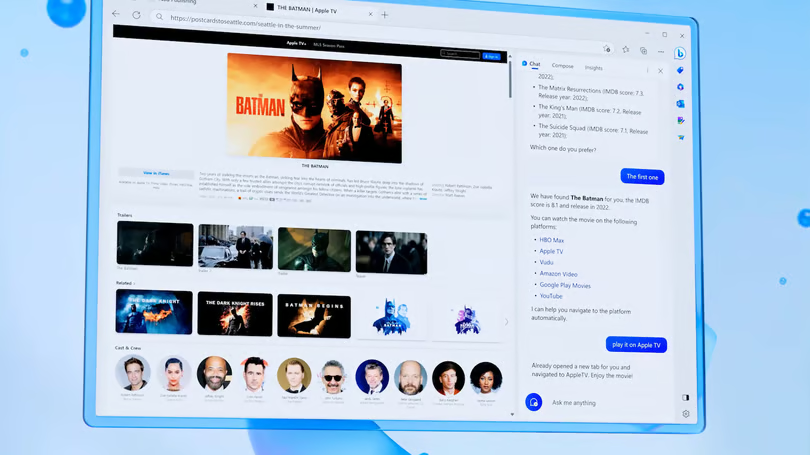
Edge Actions make Bing Chat work more like a digital assistant, allowing it to take actions on your behalf instead of simply providing search results. For example, if you’re looking for a movie to stream, Bing can show you which services offer it. With Actions, you can then ask Bing Chat to open the movie directly on the streaming service you choose, without having to navigate through search results (Figure D).
The same functionality can simplify tasks such as making restaurant reservations. If you ask Bing Chat for restaurant recommendations, Actions can open OpenTable with the selected restaurant ready for booking. You can then review and confirm the reservation directly from the Edge sidebar instead of completing the process on the website.
Figure D
Here’s a polished rewrite that keeps the technical details intact while improving readability and flow:
More Services and Third-Party Plugins
Edge Actions will become much more useful as Microsoft adds support for more services. To expand Bing Chat’s capabilities, Microsoft is working with OpenAI to give developers a way to create plugins similar to those already available for ChatGPT. These plugins can connect Bing Chat to specific information sources or allow it to use external services to process and present information in different ways.
For example, a WolframAlpha action could provide more advanced visualizations than a basic chart, helping Bing Chat handle more complex science and mathematics questions. It could also give users access to data that has been verified and maintained by subject-matter experts.
OpenTable and WolframAlpha are already among the services supported by ChatGPT plugins, alongside platforms such as Expedia, Instacart, Kayak, Klarna, and Zapier. Because these companies have partnerships with OpenAI, some could potentially bring similar functionality to Bing Chat as its plugin ecosystem expands.
Microsoft was expected to share more information about how developers can build for Bing Chat and Edge Actions at its Build developer conference. The company also said that Edge updates featuring the new Bing Chat capabilities would roll out “in the coming weeks” across Windows 10, Windows 11, macOS, iOS, and Android. The next Edge beta release was scheduled for around May 9, although it was unclear whether the new Bing Chat features would first appear in a Canary release.
Keep Your Expectations in Check
Bing Chat is still a preview service, and Microsoft continues to experiment with and refine its capabilities. As with any generative AI tool, users should verify the information they receive rather than assuming every response is accurate.
Although Bing Chat uses information from web pages to provide more current and relevant answers, the underlying GPT-4 language model generates responses by predicting what information is most likely to answer a user’s question. As a result, it can sometimes produce convincing details that are not supported by reliable sources—or may not be true at all.
For that reason, Bing Chat can be a useful research and productivity tool, but its responses should still be checked against trustworthy sources, particularly when accuracy is important.
Frequently Asked Questions
Is Bing Chat available to everyone?
Yes. Microsoft removed the Bing Chat waitlist, allowing users to access the service without waiting for approval. You still need Microsoft Edge and a Microsoft account.
What are Edge Actions in Bing Chat?
Edge Actions allow Bing Chat to perform certain tasks instead of simply providing information. For example, it can help open streaming content or assist with restaurant reservations through supported services.
Can Bing Chat use third-party plugins?
Microsoft has been working with OpenAI to allow developers to create plugins that connect Bing Chat with external services and specialized information sources.
Can Bing Chat provide information from images?
Microsoft has been developing multimodal capabilities that allow users to upload or paste images into conversations and use them to find or understand related information.
Is Bing Chat always accurate?
No. Bing Chat can sometimes generate incorrect or unsupported information. Since it relies on a generative AI model, users should verify important claims against reliable sources rather than assuming every response is accurate.
Conclusion
Bing Chat has evolved beyond a simple AI-powered search feature, adding capabilities such as persistent conversations, image and video support, the Edge sidebar, Insights, Compose, and Edge Actions. These tools make it easier to research information, understand web pages, create content, and complete certain tasks without constantly switching between websites.
However, Bing Chat is still a preview product, and its AI-generated responses can sometimes contain inaccurate or unsupported information. As Microsoft continues expanding its features and third-party integrations, Bing Chat has the potential to become a more capable digital assistant, but users should continue to verify important information before relying on its answers.
