


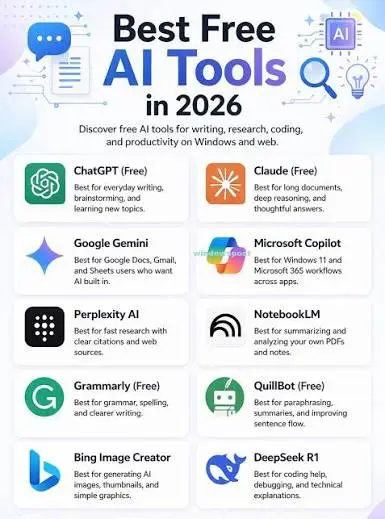
Artificial intelligence has become a practical part of everyday work, studying, content creation, research, and productivity. The good news is that you do not need an expensive subscription to start using powerful AI tools.
In 2026, several leading AI platforms offer useful free tiers, although most have usage limits or reserve some advanced features for paid users. ChatGPT’s free tier, for example, currently includes web search, file and image uploads, data analysis, image creation, and access to GPTs, subject to limits.
Whether you are a student, content creator, freelancer, developer, or simply curious about AI, these 10 best free AI tools are worth trying.
1. ChatGPT — Best All-Around AI Assistant
ChatGPT is one of the most versatile AI tools available today.
You can use its free tier for tasks such as writing, brainstorming, studying, coding, analyzing information, working with files and images, searching the web, and creating images. OpenAI notes that free-tier limits can change and that some tools have separate usage limits.
Best for:
- Writing and editing
- Research
- Brainstorming
- Coding
- Studying
- Data analysis
- Image generation
Why try it: If you want one AI assistant that can handle many different tasks, ChatGPT is an excellent starting point.
2. Google Gemini — Best for Google Ecosystem Users
Google Gemini is Google’s AI assistant and a strong alternative to other general-purpose AI chatbots.
Its biggest advantage is its connection to Google’s ecosystem. Depending on the account, region, and current feature availability, Gemini can be useful for research, writing, brainstorming, and working with information.
Recent comparisons also highlight Gemini’s usefulness for research and its integration with Google services.
Best for:
- Research
- Brainstorming
- Writing
- Google ecosystem users
- Summarizing information
Why try it: It is particularly appealing if you already rely heavily on Google Search and Google Workspace.
3. Claude — Best for Natural Writing and Analysis
Claude from Anthropic is another popular AI assistant, particularly useful for writing, analysis, brainstorming, and coding.
Claude has developed a strong reputation for producing natural-sounding responses and handling longer, complex instructions.
A recent academic study of consumer AI assistants found that Claude users showed particularly strong trust in the platform, while other research has highlighted its use in coding workflows.
Best for:
- Long-form writing
- Editing
- Analysis
- Coding
- Brainstorming
Why try it: If writing quality and detailed analysis matter to you, Claude is worth comparing with other AI assistants.
4. Perplexity — Best AI Tool for Research
Perplexity takes a different approach from traditional chatbots by focusing heavily on search and research.
It can be particularly useful when you want an answer accompanied by sources that you can investigate further.
Recent coverage of free AI research tools identified Perplexity as one of the strongest options for real-time web research and citation-backed answers.
Best for:
- Online research
- Fact-checking
- Finding sources
- Current information
- Quick research summaries
Why try it: Instead of opening dozens of search results, you can use Perplexity to quickly organize information and then check the cited sources yourself.
5. Canva — Best AI Tool for Design
Canva is more than a traditional graphic-design platform. Its AI features can help users create and edit visual content without advanced design skills.
You can use Canva for social media graphics, presentations, posters, thumbnails, marketing materials, and other visual projects.
Canva has also become a significant player in the AI ecosystem by integrating AI capabilities directly into its broader design platform.
Best for:
- Social media posts
- YouTube thumbnails
- Presentations
- Posters
- Marketing graphics
- Basic AI-assisted design
Why try it: It is a practical choice for people who want AI-powered design without learning professional graphic-design software.
6. Grammarly — Best AI Writing Assistant
Grammarly is useful if your biggest concern is writing clearly and correctly.
Its free plan currently provides writing assistance, tone feedback, and a limited number of AI prompts. Grammarly also offers proofreading, paragraph rewriting, and other AI-powered features, with additional capabilities available on paid plans.
Best for:
- Grammar checking
- Blog writing
- Emails
- Professional writing
- Improving clarity
- Tone suggestions
Why try it: It works well as a second pair of eyes for your writing.
7. NotebookLM — Best for Studying Your Own Sources
Google’s NotebookLM is designed around your own source material, making it especially interesting for students, researchers, and professionals.
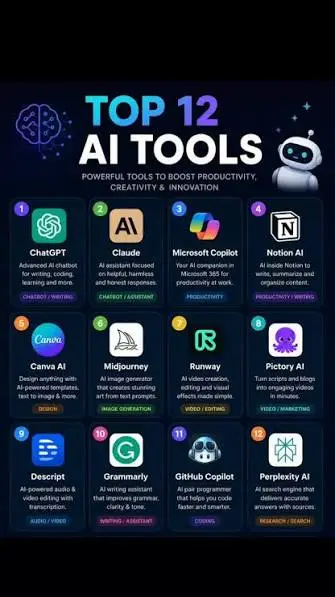
Instead of simply asking an AI general questions, you can provide source material and use AI to help understand and work with that information.
It can be particularly useful for:
- Study materials
- Research documents
- Reports
- Notes
- Long documents
- Summaries
Best for:
Students, researchers, and anyone who regularly works with large amounts of reference material.
Why try it: It shifts the AI experience from simply asking questions to working directly with the material you provide.
8. Microsoft Copilot — Best for Microsoft Users
Microsoft Copilot is another useful option for people already working within Microsoft’s ecosystem.
It can assist with everyday questions, writing, brainstorming, research, and productivity tasks, although specific features and free availability can change over time.
One important 2026 development is Microsoft’s move to replace its free Deep Research experience with the paid Researcher AI feature beginning August 18, 2026, according to recent reporting.
Best for:
- Microsoft users
- Everyday AI assistance
- Writing
- Research
- Productivity
Why try it: If you already use Microsoft’s ecosystem, Copilot can fit naturally into your existing workflow.
9. Elicit — Best for Academic Research
If you are a student or researcher, Elicit is worth exploring.
The platform focuses on research workflows and can help users discover and analyze academic literature.
Recent reporting on free AI research alternatives highlighted Elicit as a tool focused specifically on academic research and scientific literature.
Best for:
- Academic research
- Literature reviews
- Finding research papers
- Research questions
- Students and academics
Why try it: Unlike general-purpose AI assistants, Elicit is designed around research rather than everyday chat.
10. ChatPDF — Best for Asking Questions About PDFs
ChatPDF is useful when you have a document and want to interact with its contents using natural-language questions.
Instead of manually searching through a long PDF, you can ask questions about the document and use AI to help summarize or understand its contents.
Best for:
- PDF summaries
- Study documents
- Reports
- Manuals
- Research papers
- Long documents
Why try it: It can save considerable time when you need to extract specific information from lengthy documents.
Best Free AI Tools Compared
| AI Tool | Best For | Free Access |
|---|---|---|
| ChatGPT | Overall AI assistant | Yes, with limits |
| Google Gemini | Research & Google users | Yes, with limits |
| Claude | Writing & analysis | Free tier available |
| Perplexity | Web research | Free tier available |
| Canva | AI-assisted design | Free plan available |
| Grammarly | Writing & grammar | Free plan available |
| NotebookLM | Documents & studying | Free access available |
| Microsoft Copilot | Microsoft users | Free access varies |
| Elicit | Academic research | Free access available |
| ChatPDF | PDF analysis | Free access available |
Note: Free features, limits, models, and regional availability can change. Always check the official service before relying on a specific feature.
Which Free AI Tool Should You Choose?
There is no single AI tool that is best for everyone. The right choice depends on what you want to accomplish.
- For general tasks: ChatGPT
- For Google users: Gemini
- For writing and analysis: Claude
- For web research: Perplexity
- For graphic design: Canva
- For grammar and editing: Grammarly
- For studying documents: NotebookLM
- For Microsoft users: Copilot
- For academic research: Elicit
- For PDFs: ChatPDF
The best strategy is not necessarily to choose one tool. Many users can get better results by combining different AI tools—for example, using Perplexity for research, Claude or ChatGPT for drafting, and Grammarly for final editing.
Are Free AI Tools Really Free?
Yes, but “free” usually does not mean unlimited.
Many AI companies use a freemium model. You can use the basic service without paying, while advanced models, higher usage limits, premium features, or additional capabilities may require a subscription.
For example, OpenAI explicitly says ChatGPT’s free tier has usage limits, while paid plans provide higher limits.
The same principle applies across much of the AI industry, so check the current pricing page before choosing a tool for heavy daily use.
How to Get Better Results From Free AI Tools
Getting good results is not just about choosing the right AI platform. Your instructions matter too.
Try these simple practices:
- Give the AI context. Explain your goal and audience.
- Be specific. Instead of “write an article,” explain what you need.
- Provide examples. Show the style or format you want.
- Break complex tasks into steps.
- Verify important information. AI can make mistakes.
- Use multiple tools when appropriate. One tool may be better at research while another is better at writing.
- Avoid sharing sensitive personal or confidential information.
Frequently Asked Questions
What is the best free AI tool in 2026?
ChatGPT is one of the strongest all-around choices because its free tier supports multiple capabilities, including web search, file and image uploads, data analysis, and image creation, although usage limits apply.
Which AI tool is best for research?
Perplexity is a strong choice for web research because it focuses on finding information and presenting sources alongside its answers.
What is the best free AI tool for students?
Students can benefit from ChatGPT, Gemini, NotebookLM, and Elicit. The best option depends on whether the task involves general studying, source-based research, writing, or academic literature.
Are free AI tools safe to use?
Free AI tools can be useful, but users should understand each service’s privacy and data policies before uploading confidential documents or sensitive information.
Can AI tools replace human writers?
AI can assist with research, brainstorming, drafting, and editing, but human judgment remains important for accuracy, originality, fact-checking, and final editorial decisions.
Which AI tool is best for writing?
ChatGPT and Claude are strong general-purpose options, while Grammarly is particularly useful for proofreading, clarity, and writing assistance. Grammarly’s free plan includes grammar-focused assistance and a limited number of AI prompts.
Conclusion
The best free AI tools in 2026 are no longer limited to simple chatbots. They can help with research, writing, design, studying, coding, productivity, document analysis, and everyday tasks.
If you are completely new to AI, start with ChatGPT, Gemini, or Claude. For research, add Perplexity. For visual content, try Canva, while students and researchers should consider NotebookLM or Elicit.
The important thing is to choose tools based on the job you need to complete—not simply which AI platform is the most popular.

1 Comment
Pingback: AI Video Editing in 2026: Tools & Workflows